Upstream -> sending Downstream -> receiving (downloads, etc.)
Modem -> modulator + demodulator Splitter-> multiplexes and demultiplexes signals
Shared access -> various houses use the same cable, competing for bandwidth. Dedicated access -> each house has it's own cable.
DSL
DSL Modem -> turns digital signal(PC) into analog signal(cable) and vice versa.
DSLAM -> splits analog signals (analog voice, analog internet, ...) turning internet signal into digital. On the opposite direction, turns the internet signal into analog and joins the telephone and internet signals. Kinda of a mix between the splitter and the DSL modem. It multiplexes and demultiplexes plus modulating and demodulating
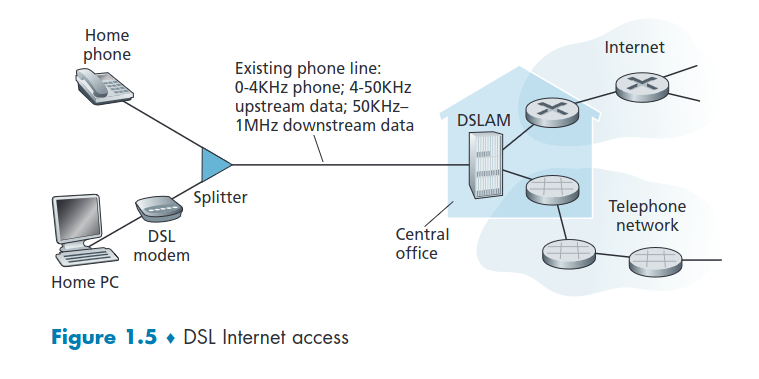
- Uses existing telephone infrastructures to central DSLAM -> data over DSL phone line goes to Internet -> voice over DSL phone line goes to telephone net
- 3.5-16 Mbps dedicated upstream transmission rate
- 24-52 Mbps dedicated downstream transmission rate
- dedicated physical line to telephone central office
Cable Internet Access
Fiber optics connect the cable head to end to neighborhood-junctions (fiber nodes) from which traditional coaxial cable is then used to reach individual houses and apartments. Each neighborhood junction typically supports 500 to 5,000 homes. Because both fiber
and coaxial cable are employed in this system, it is often referred to as hybrid fiber
coax (HFC).
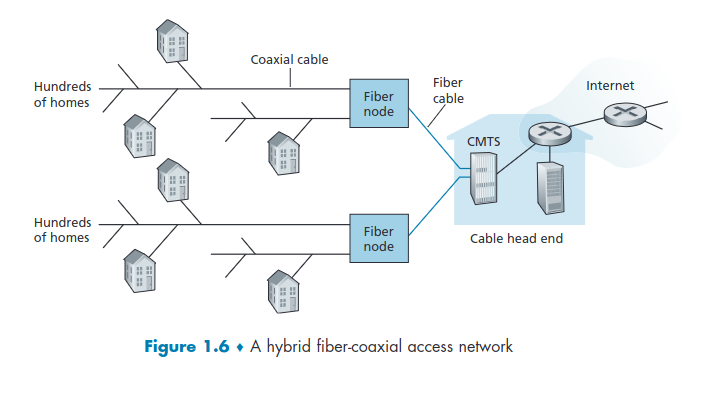
Cable internet access requires special modems, called cable modems. External device that connects to PC through an Ethernet port.
The cable modem termination system (CMTS) similar to DSLAM -> turns analog signals into digital format and vice versa.
Cable modems -> divide the HFC network into two channels, downstream and upstream. -> is asymmetric downstream channel (up to 30 Mbps) higher transmission rate than upstream channel (up to 2 Mbps).
- Does not use telephone infrastructures -> instead uses cable TV infrastructures
- HFC: Hybrid fiber coax -> asymmetric: up to 40 Mbps – 1.2 Gbps downstream transmission rate, 30-100 Mbps upstream transmission rate
- network of cable and fiber attaches homes to ISP router -> home share access to router (shared broadcast medium) (share different houses traffic; the traffic compete for cables bandwidth) -> unlike DSL, which has dedicated access (data specific to each house)
Because of the shared access if several users are simultaneously downloading a video file on the downstream channel, the actual rate at which each user receives its video file will be significantly lower than the aggregate cable downstream rate.
Because the upstream channel is also shared, a distributed multiple access protocol is needed to coordinate transmissions and avoid collisions.
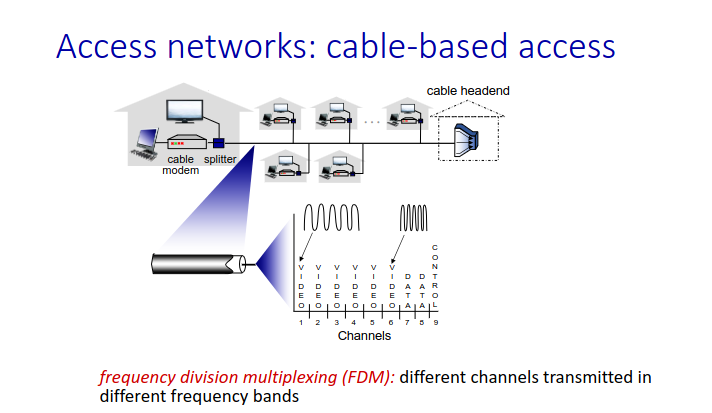
FDM -> frequency division multiplexing. Cut the frequency into non overlapping sub-ends (video, data, control).
FTTH
FTTH (fiber to the home) -> provides an optical fiber path from the Central Office to the home, can potentially provide internet access rates in the gigabits per second range. Can be asymmetric or symmetric depending on the ISP subscription.
Dosent exploit telephone or tv infrastructures. Builds its one infrastructure
-
Optical links from central office to the home
-
Two competing optical technologies: -> Passive Optical network (PON)-> no signal amplification uses "mirrors" to split -> Active Optical Network (AON) -> amplify signals useful when traveling long distances were there are various splitters EX: Apartments (switched Ethernet)
-
Much higher Internet rates; fiber also carries television and phone services
OLT -> optical line terminal-> collects signal and converts into digital bits ONT -> Optical network terminator
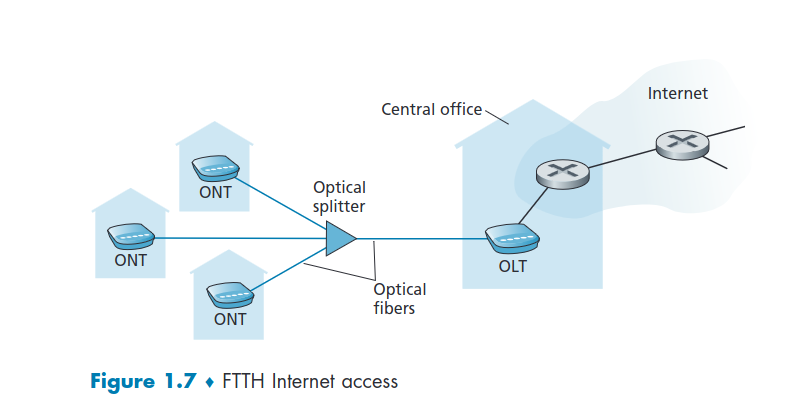
The splitter combines a number of homes (typically less than 100) onto a single, shared optical fiber, which connects to an optical line terminator (OLT) in the telco’s CO. At home, users connect a home router (typically a wireless router) to the ONT and access the Internet via this home router.
5G fixed wireless
- Not only promises high-speed residential access, but will do so without installing costly and failure-prone cabling from the telco’s CO to the home.
- With 5G fixed wireless, using beam-forming technology, data is sent wirelessly from a provider’s base station to the a modem in the home.
- A WiFi wireless router is connected to the modem (possibly bundled together), similar to how a WiFi wireless router is connected to a cable or DSL modem.
Ethernet and WiFi
LAN (Local Area Network) -> used to connect an end system to the edge router WIFI-> IEEE 802.11 technology
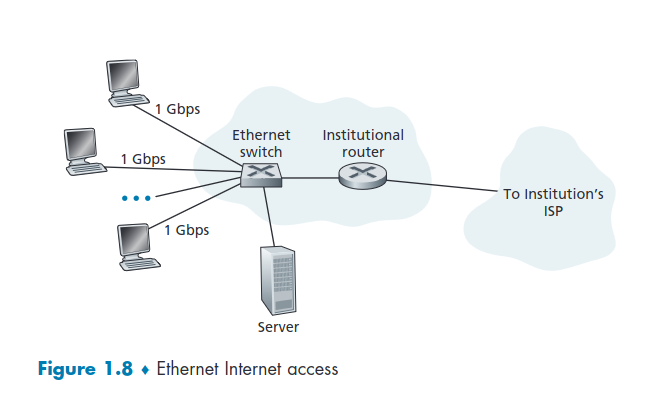
- That are many LAN technologies but Ethernet is the one most typically used in companies, universities, (...) because they have direct access to the ISP's edge router.
- 10 Mbps(10 years ago), 100Mbps, 1Gbps(most used), 10Gbps Ethernet
- Today, end systems typically connect into Ethernet switch
- Ethernet users use twisted-pair copper wire to connect to an Ethernet switch
- In a wireless LAN setting, wireless users transmit/receive packets to/from an access point that is connected into the enterprise’s network(most likely using wired Ethernet), which in turn is connected to the wired Internet. User must typically be within a few tens of meters of the access point
- Many homes combine broadband residential access (that is, cable modems or DSL) with these inexpensive wireless LAN technologies to create powerful home networks
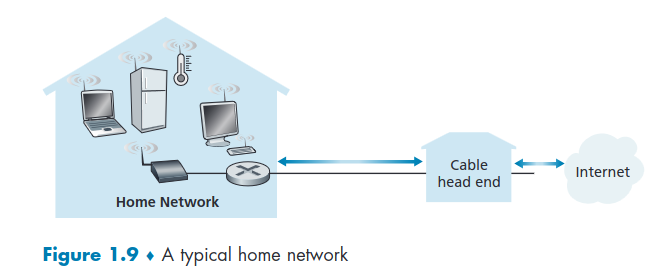
Ethernet -> wired access at 100Mbps, 1Gbps, 10Gbps
WiFi -> wireless access points at 11, 54, 450 Mbps
- Shared wireless access network connects end system to router -> via base station aka "access point"
- wireless LANs: ->WIFI -> 11 or 54Mbps
Wide-Area Wireless Access: 3G and LTE 4G and 5Gsymmetric depending on the ISP subscription.
-
These devices employ the same wireless infrastructure used for cellular telephony to send/receive packets through a base station that is operated by the cellular network provider. Unlike WiFi, a user need only be within a few tens of kilometers (as opposed to a few tens of meters) of the base station.
-
wider-area wireless access -> provided by telco operator -> 1Mbps (3G) over cellular system (EVDO,HSPA) -> next up 5G -> WiMAX (up to 100s Mbps)
4G -> download speeds of up to 60 Mbps.
1.2.2 - Physical Media
HFC -> uses a combination of fiber cable and coaxial cable DSL and Ethernet-> use copper wire Mobile Access Networks -> use the radio spectrum
bit -> propagates between transmitter/receiver pairs
**physical link **-> what lies between transmitter & receiver
-
Physical media fall into two categories:
Guided Media -> the waves are guided along a solid medium (fiber-optic cable, twisted-pair copper wire, coaxial cable)
Unguided Media-> the waves propagate in the atmosphere and in outer space (wireless LAN, digital satellite channel). Propagated unidirectional everywhere
Twisted-Pair Copper Wire
- Least expensive and most commonly used guided transmission medium
- Two insulated copper wires, each about 1 mm thick, arranged in a regular spiral pattern
- A wire pair constitutes a single communication link
- Category 5: 100 Mbps, 1 Gbps Ethernet
- Category 6: 10Gbps Ethernet
- Was slow in the past but has emerged as the dominant solution for high-speed LAN networking
- Commonly used for residential Internet access
Coaxial Cable
- Like twisted pair, consists of two copper conductors, but the two conductors are concentric rather than parallel.
- Quite common in cable television system
- Can be used as a guided shared medium, a number of end systems can be connected directly to the cable
- bidirectional
- broadband:
-> multiple frequency channels on cable
-> HFC -> 100’s Mbps per channel
Fiber Optics
- Thin, flexible glass fiber medium that conducts pulses of light, with each pulse representing a bit.
- high-speed operation:
->high-speed point-to-point transmission (10’s-100’s Gbps) - low error ratio:
-> repeaters spaced far apart
-> immune to electromagnetic noise
Terrestrial Radio Channels
- Signals in the electromagnetic spectrum
- propagation environment effects:
-> Reflection
-> Obstruction by objects
-> Interference/noise - Terrestrial radio channels can be broadly classified into three groups that operate: -> Over very short distance (e.g., with one or two meters) (headsets, keyboards, and medical devices) -> In local areas, typically spanning from ten to a few hundred meters (wireless LAN technologies) -> In the wide area, spanning tens of kilometers (wide-area access)
Satellite Radio Channels
-
Links two or more Earth-based microwave transmitter/receivers, known as ground stations (up to 45 Mbps channels)
-
Signals carried in electromagnetic spectrum waves
-
The satellite receives transmissions on one frequency band, regenerates the signal using a repeater (discussed below), and transmits the signal on another frequency
-
up to < 100 Mbps (Starlink) downlink
-
Bluetooth -> cable replacement short distances, limited rates (~2Mbps)
-
Two types of satellites are used in communications:
Geostationary satellites -> permanently remain above the same spot on Earth (introduces a substantial signal propagation delay)of 270 msec). Can operate at speeds of hundreds of Mbps, are often used in areas without access to DSL or cable-based Internet access.
Low-Earth Orbiting (LEO) satellites -> placed much closer to Earth and do not remain permanently on one spot. Rotate around Earth and may communicate with each other and ground stations. To provide continuous coverage to an area, many satellites need to be placed in orbit. May be used for Internet access sometime in the future.