- Time Sharing the CPU allows virtualization.
- Few challenges: -> Performance: not adding excessive overhead to the system -> Control: The OS must retain control of the CPU
6.1 Basic Technique: Limited Direct Execution
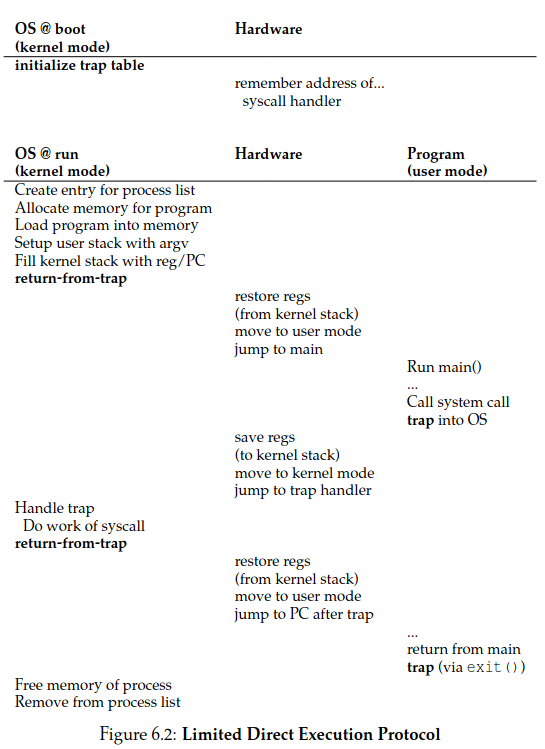
- When the OS wishes to start a program running: -> Creates a process entry for it in a process list -> Allocates some memory for it -> Loads the program code into memory -> Locates and jumps to its entry point(i.e, the main()) -> Starts running the users code
6.2 Problem #1: Restricted Operations
- Direct execution is fast, as it runs natively on the hardware CPU.
- How to let a running process on the CPU to perform restricted operations, such as I/O requests to a disk, access to more memory or CPU?
- User Mode is restricted in what can do. A process can't issue I/O Requests, doing so would raise an exception and the OS would likely kill them.
- Kernel Mode which the OS or kernel runs. Code that runs can do what it likes.
- To users in user mode to do privileges operations (memory allocation, process creation and communication, ...) they preform system calls (most OS provide a few hundred calls)
- To execute a system call the OS does a trap, that jumps into the kernel and raises the privilege level to kernel mode. When finished the OS call a return-from-trap instruction back to user mode
- When executing a trap, the process will push the program counter flags (PC) and a few other registers onto a pre-process kernel stack; the return-from trap will pop these values off the stack and resume execution of the user mode program.
- The kernel must carefully control what code executes upon the trap so it doesn't jump anywhere in the kernel, what would be a very bad idea.
- The kernel sets a trap table at boot time in privilege mode configuring machine hardware as need be.
- Therefore the OS tells the hardware the location of this trap handlers (code that must be run when certain exceptional events occur, like hard disk interrupts, keyboard iterrupt or when a program does a system call)
- A system-call number is usually assigned to each system call. User code cannot specify an exact address to jump to, but rather is responsible for placing the desired system-call number in a register or at a specified location on the stack.
- when handling the system call inside the trap handler, the OS examines this number, ensures it is valid, and, if it is, executes the corresponding code.
- Each process has a kernel stack where registers (including general purpose registers and the program counter) are saved to and restored from (by the hardware) when transitioning into and out of the kernel.
- An Interrupt occurs when devices that may not be related with the currently running process, like when a device (disk, keyboard, network card) requires OS attention. Ex: when a process issues a read from a file, the disk requires dome time to bring that info to memory
- Both trap and interrupt instructions are hardware-assisted.
- A timer interrupt helps preventing malicious or buggy program to take access from de CPU (EX: infinite loops). Every X milliseconds an interrupt is generated by the hardware giving back CPU access to the OS. The OS is the responsible for setting this timer interval at boot time
6.3 Problem #2: Switching Between Processes
- If a process is running on the CPU, this by definition means the OS is not running,
- How can the operating system regain control of the CPU so that it can switch between processes?
A Cooperative Approach: Wait For System Calls
Cooperative Approach -> the OS trusts the processes of the system to behave reasonably
-
Processes that run for too long are assumed to periodically give up the CPU so that the OS can decide to run some other task.
-
The OS scheduler decides which process to run and when to switch to another.
-
When the scheduler decides to switch processA with processB, a context switch is made. The processA information is daved into it's PCB(A) structure (Process Controlo Block) that resides on the process list and restores B's from PCB(B).
-
Whenever a system call to disk is made, for example, the OS will probably schedule another process to run